Showing posts with label logic pro. Show all posts

Wednesday, September 4, 2013

3 Songs, 3 DAW's, Part 2 - Pro Tools 10

Back once again, with part 2 of the "3S3D" series. Yes, I realize this series is VERY slow going, but rest assured I'm determined to see it through to the end. If you wish to hear the final results now, feel free to click below...


For this second installment of the series, I originally planned to record a song from scratch, using Reason 6 as my DAW of choice. However, at some point I realized things track were not working out the way I had hoped. My problems were with motivation and inspiration. Motivation to record a song from scratch using a program I'm not very familiar with (which, unfortunately, was exactly what this task entailed!). And inspiration to come up with a track, arrangements, production ideas, etc. So in the meantime I decided to re-work and re-mix one of my old projects and see what I could do with it using Pro Tools, so I could get  some sort of project completed, using tools I'm much more familiar with.

This instrumental originated as a basic "idea" sort of track that I recorded back in 2004, using Pro Tools LE on my first Power Mac G4. The title "Saturday" has no significance really, other than it was the day on which I recorded it, and I couldn't think of anything better... This was a long time ago, but I'm fairly sure that all the instruments were recorded all in one day in a single session, different from how I record these days, to be sure. At the time I believed that I would some day come up with some lyrical ideas and turn it into a "song", but nothing has come to me so far. So until that day arrives, it will continue to live out its days as an instrumental.

As far as the changes that I made from the original version, I did a bit of editing to delete some parts of the original arrangement, which was about 4:30 long. I felt it needed to be shortened in some sections, just to keep things moving along, so to speak. As you can see from the Soundcloud timeline, this new version clocks in at 3:22. The edits were made to hopefully keep from boring the listener too much. Because this was born as an "idea" track, I didn't really play all the parts as tightly on the beat as I could have. So after listening to it again 9 years later, it was apparent that some fixing of parts here and there was needed, using a bit of editing "magic". Some of the new arrangement ideas were born out of necessity for the same reason. As much as I would have loved to re-record certain parts, I decided to simply work with what was already there.

I decided to re-visit this piece because I still like the musical idea, and my overall skills using Pro Tools have much improved since 2004. Especially since the past 3 months or so, I feel that I have much more of an idea of what I'm doing as far as mixing goes. Some newly acquired skills in using Pro Tools itself, as well as general mixing skills, seemed to help out quite a bit in finishing this new version. In fact, this just may be a new upcoming "experiment" of mine; to continue re-visiting more of my old Pro Tools recordings, and re-mix them to more "listenable" standards...

Now, on to the software. As I mentioned before, I recently upgraded my Pro Tools from LE 8 to version 10. In detail, Pro Tools 9 was bundled with the new Mbox audio interface I purchased last year. But I had no intention of using PT 9 at all. Since PT 10 was already out when I bought the Mbox/PT 9 bundle, I was allowed to upgrade to 10 free of charge. Perhaps I'll talk about my experiences with the new Mbox in a future post.

After putting this new version through its paces, I would say that I'm very pleased with it. Although there weren't any life-changing improvements in this version, there were some incremental ones that improved my workflow, and allows me to get the results I'm looking for.

Pro Tools' Edit Window.

Mix Window.
Version 9 (I chose to skip this upgrade) introduced the ability for Pro Tools to be used with "3rd party audio interfaces"; meaning audio interfaces other than those sold by Avid (the company that develops and sells the Pro Tools software), as well as the option of using your computer's native audio outputs, eliminating the need to a separate audio interface at all. This feature is fairly new for Pro Tools users, as they previously required the use of the interfaces to use the software at all. So, this little convenience may come in handy for me someday.

Secondly, Pro Tools 10 comes with standard with a new "channel strip" plugin, which allows you to get right down to business of the most important audio processing you will do as a DAW user. This plugin emulates the functions of the audio channel of a large format audio mixing console, the kind found in the big-time commercial recording studios. These mixing  console channels typically include EQ, Compression, Expansion, and Gating controls. Without a plugins like these, you can certainly get the job done with individual plugins of each type of effect you need, but it's convenient to have all these functions in a single plugin. I also recently treated myself to the SSL 4000 Collection bundle, by Waves. Part of this bundle includes my new favorite plugin, the SSL E-Channel. This plugin as well as the others in this bundle are emulations of legendary SSL mixing consoles, used to record and mix hit records too numerous to mention. After using both the Avid Channel Strip and the SSL plugin on this mix, I must say that I am a new fan, and will continue to use them on other projects to come. These types of plugins helped me to limit my choices of effects and other processing in a positive way, and apply more focus to getting the mix done.

Avid's Channel Strip Plugin, comes standard with Pro Tools 10.
Waves SSL E-Channel Plugin.
A new feature in Pro Tools 10 is Clip Gain, which allows you to reduce the amount of gain (volume) on a section of audio in your project on-the-fly and in real-time, without having to process and create a whole new audio file similar to older versions of Pro Tools. Also new are features to let you automatically import your new mix into your iTunes library, and upload to SoundCloud as well as Gobbler, an online storage and file sharing website, seemingly geared towards audio and other media creators. The "import to iTunes" feature was especially handy in quickly checking out new mix versions. These handy little features make Pro Tools 10 a nice, if not a "can't-live-without" upgrade for me.

Pro Tools' Clip Gain feature allows changes in volume to individual pieces of audio in real-time.
In some way it feels strange to be "reviewing" these DAW's at this point in time, because I'm always a bit behind the times. It seems that by the time it takes me to post a new piece of music, the DAW that I'm talking about has already been upgraded to a new version. Pro Tools is now on version 11; Reason was also updated to version 7 earlier this year; and just this past July, Apple FINALLY released Logic Pro X.


However, I understand that it doesn't matter in the big scheme of things. For one, just because these DAW's have moved on to new versions, it doesn't mean that I can't continue on with my "experiments" simply using what I have, which are great tools in their own right. They perhaps don't have the shiny newness of whatever version they happen to be on at the moment, but does not in any way hinder me from making music.


Secondly, it looks like the computer system requirements for all 3 new versions are beyond the specs of my current laptop; so, apparently I couldn't upgrade to them if I wanted to. It doesn't really bother me, though. The software versions I'm working with are MORE than capable of being the tools I need to produce some high quality recordings. I remember when all I had to record to was a cassette boombox, so I've got to keep some perspective. I'm still learning and re-learning the important lesson of not focusing on the "tools" themselves (as cool as they are!), but actually learning and using these tools to actually create SOMETHING.

Soon I will start working on my new track in Reason 6, for the 3rd and final installment of this series. Until next time...

Sunday, May 12, 2013

3 Songs, 3 DAW's, Part 1 - Logic Pro 9

I've finally completed the first entry of my "3 Songs, 3 DAW's" experiment. For those who don't care to read my ramblings below and simply want to hear the track, here it is...


Avid's Pro Tools was my introduction to computer-based recording, and has since been my recording platform of choice. It wasn't my introduction to digital recording in general, because I'd been using (and still own) an 8-track digital recorder called the Roland VS-880EX since 1999, then got my first Macintosh G4 in 2003 to run Pro Tools LE. As time went on, I would read about the intriguingly cool features of other DAW's on the market, and figured this project would be a good way to explore what other DAW's have to offer, and satisfy my curiosity.

I recorded and mixed the song above in Apple's Logic Pro. Much like Apple's computer hardware lines, many of their software titles are divided into "professional" and "consumer" categories. In the case of their audio software, Logic Pro is their "professional" DAW, the "consumer" level  program being their also-excellent Garageband, which comes installed with a new Mac computer purchase.

Logic's history actually goes back to the early 90's, originally developed by a company called Emagic, and then was purchased by Apple in 2002. Logic has been a Mac-only program for a while now, but before Apple bought Logic, it was available for both the Mac and Windows. Once Logic became an Apple product, they initially had two versions, Logic Pro and Logic Express, which is my first experience with the software, and I later upgraded to the Pro version. Apple have since discontinued Logic Express, and now carry on with Logic Pro and Garageband.

Overview of Logic Pro's Main Window.

Below are some observations on Logic Pro, describing some feature and workflow comparisons to Pro Tools, in no particular order:

Audio Region Editing - The most major learning curve for me was in this area. From a Pro Tools user's perspective, Logic Pro's editing tools seemed a bit foreign at first. However, with some of time and practice, it got easier. On the plus side for Logic, they have what's called a "Smart" time grid setting, allowing the user to easily and quickly select exactly what section of audio they want to edit with the mouse, depending on the zoom level they're using in the Edit window. It accurately "snaps" your highlighted selection to the grid for whole bars of audio, or way down to the super-detailed waveform transient level. Pro Tools' Edit window gives the user many of the same edit options, but the grid "snap level" has to be selected manually.

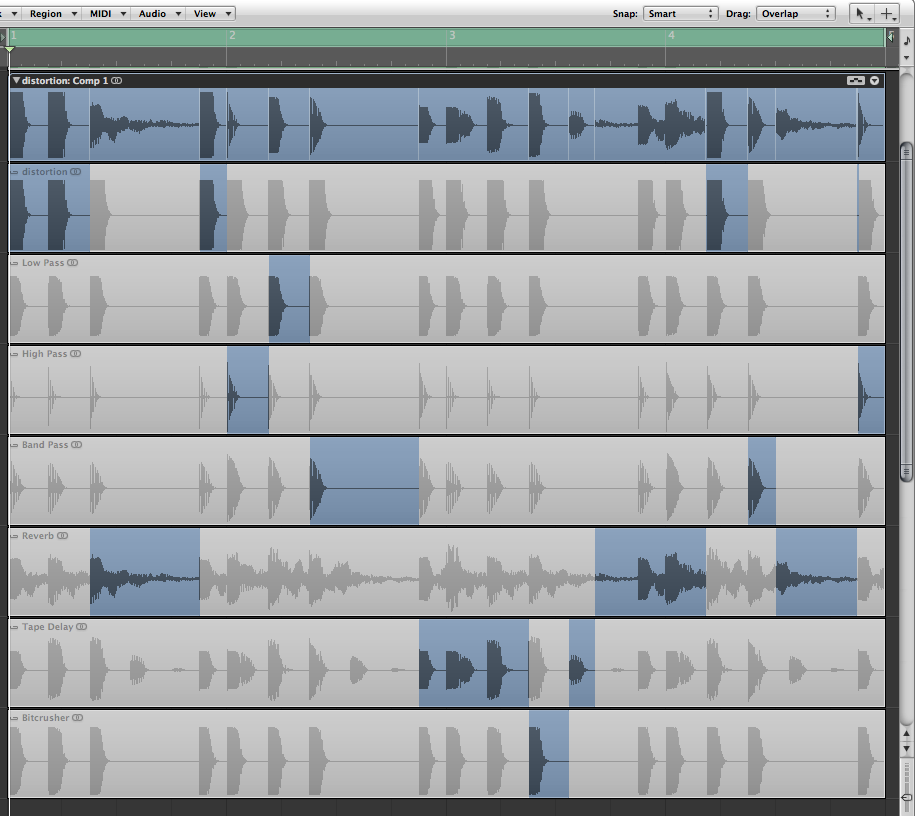
Composite (Comp) Track Editing - Here's an area where I feel that Logic Pro has the advantage. Their "Quick Swipe Comping" feature is well implemented, and probably my favorite feature. Very easy to audition sections of multiple takes by simply swiping the area of the region you want to hear, and clicking that area in a different take lane to hear an alternate version of that particular section - very intuitive. Pro Tools' version of that feature is not bad, but you have to click a "solo" button for each take lane you want to audition, then click another button to commit to the comp selections that you chose. These extra steps makes the process a bit "clunky" in comparison to Logic Pro. A minor gripe perhaps, but I see all those extra mouse clicks adding to the total time spent editing your tracks. Logic Pro also inserts crossfades automatically between your edit points to ensure a smooth transition between takes. Pro Tools requires you to insert the crossfades manually, though you can set it up to perform a "batch fade", which places fades between multiple audio regions.

Quick Swipe Comping makes editing multiple takes a breeze.
Plugins - I've got to say that while I find Logic Pro's audio plugins to be high quality sound-wise, the user interface for many of the plugins controls is the thing I like least about the program. The interface designs on the virtual instruments in particular, range from slightly confusing to downright horrible! The UI's for the effects aren't much better. For that reason, it took me longer than expected to figure out how to get what I needed out of the plugins. Pro Tools plugin UI's are much more user friendly in my opinion, because they tend to resemble a piece of audio hardware, with familiar knobs and buttons on the screen. To its credit, Logic Pro does have some stock plugins that are very useful in mixing and mastering such as multi-band compression and stereo imaging, where in Pro Tools you may have to look to 3rd party plugins for certain things, which will probably require you to spend some extra money. Free plugins that are both compatible with Pro Tools as well as worth the trouble of searching out online are few and far between in my experience.

Logic Pro's Ultrabeat plugin UI - my pick for the worst ever.

Mix Automation - Much like the tools for audio editing, the mix automation tools took some time to get up to speed in Logic Pro. However, it has a very quick way to globally raise or lower all the automation points on a track at once, where it's a bit more involved to do in Pro Tools.

Track Bouncing - Logic Pro has the capability of "bouncing", or rendering, a mix of your project to an audio file "offline", which is faster than real-time. That means that a 4 minute piece of multi-track music would take less than a minute to bounce. Pro Tools versions 10 and prior can only bounce a mix in real time. Meaning whether it's a 30 second piece of music, or an hour long recording, whatever length of time your audio is, that's how long you must wait for it to render a stereo audio file you can burn to CD, import to your iPod, or post online. Offline bouncing is a great time-saver, and is why I give Logic Pro another advantage over Pro Tools. With as many mix versions as I tend to do, it was a nice consolation that I was able to render the mixes and have them ready to play in seconds. I've recently learned that Avid has finally incorporated an offline bounce feature in Pro Tools version 11, due out later this year. Logic Pro can also send the bounce of your mix to your iTunes library as well. Pro Tools didn't have this feature until their version 10 released last year, which I finally upgraded to (more on that in a future post).

CPU Usage - Logic Pro again has an advantage here (for now). You can pile on the virtual instruments and effect plugins and your computer will (usually) not break a sweat. My understanding is that Logic intelligently applies CPU power to your tracks only when audio is actually playing through it, and doesn't when it's not. This is not the case with Pro Tools. The faster your computer is, the better off you will be, but you sometimes have to be careful with your plugin usage with Pro Tools, or you start getting CPU error messages. My understanding, again, is that the upcoming Pro Tools 11 has an all-new audio engine that intelligently distributes CPU power similar to how Logic does.

Media Browser - Integrated into Logic Pro's main window where you can easily navigate through your computer's hard drive to locate files to bring into your currently running project. A nice touch that makes it feel like Logic is tightly integrated with your Mac's entire system. On the other hand, Pro Tools' "Workspace" browser window does the job I suppose, but it's another feature I'd describe as "clunky", and I've never been a big fan of it. Again, advantage, Logic Pro. 

All said and done, once I got over the learning curves, I found Logic Pro to be a versatile, very powerful and capable DAW. My minor gripes aside, you get many awesome features all in one program, features I'm sure I've only scratched the surface of. And with its price of $199 in the Mac App Store, it's the best DAW deal on the market for Mac users that I'm aware of. Many DAW's with comparable features are easily twice the price. In comparison between Logic Pro and Pro Tools, each program has its strengths and weaknesses, which is the real the point of this post. It's about one's own personal preferences. My preference? As much as I've learned using Logic Pro for the past several months and appreciate its strengths, I've got to say that I miss working in Pro Tools. It's the platform I've used most consistently over the past 10 years, and it's the workflow that I know best. However it doesn't mean that I couldn't or wouldn't go back and re-visit Logic from time to time, take advantage of its unique features, and bring my work back into Pro Tools. When necessary, moving project data (the audio track files) from one program to another is actually pretty easy to do.

Logic Pro is currently on version 9 and has been since 2009, an eternity in the computer and software business. Many among the community of Logic users feel "neglected", and say that Apple is long overdue for a new version. I must say that I agree. Far too busy manufacturing iPhones and iPads these days, perhaps? That said, a rumor of a new version has been in the air for a while now. Although I still consider myself a Pro Tools guy first and foremost, I will be looking with interest to see what Apple comes up with for Logic Pro version 10.

One down, two to go for this series. I haven't started recording anything yet, so I've got quite a bit of work ahead of me. I've also got some additional things to talk about, regarding the whole process of recording and mixing this song that I felt should be its own separate post, coming very soon.

Saturday, July 28, 2012

3 Songs, 3 DAW's... Coming Soon.

Hello, thanks for stopping by for a visit. It's been a while for me as well, so I thought I'd stop by myself, and post an update.

A few weeks ago, I decided to get back on the recording "horse" as it were, and get to ridin' once again. I've got more songs that I'd like to demo, as well as some pieces that are mostly basic instrumental ideas at this point. I figure, once those are recorded, I can decide whether they will remain instrumental pieces, or try to add some lyric and melody to them.

However, this time around I decided to put a spin on recording this new batch of 3 songs. Being that this blog is called "the harvard experiments", I came up with what I think might be an interesting one: to record 3 songs, using a different Digital Audio Workstation (DAW, for short) program for each one.

What's the purpose of using 3 separate programs for each song, you might ask?  Well, DAW's are available from many different companies these days. While the task of recording and mixing digital audio is usually the end goal, many programs have their strengths in certain areas; their own unique spin on certain features, some of which could drastically improve the user's workflow for what they are trying to do with their project.

The 3 DAW's I am using for this project will be: Avid's Pro Tools LE 8. This is the software I used to record the 3 songs I posted earlier this year, and the one I'm most familiar with, as far as getting tasks done fairly quickly. I've been using Pro Tools since 2003, and while I don't consider myself a true Pro Tools "master", I do feel like I know what I'm doing when I work with it, more so than with any other audio program. Pro Tools is actually up to version 10 now, but I've decided not to upgrade, although I'd like to. I may get into that more in depth in a future post...
Screenshot of Pro Tools version 10 - not the one I'm using, but similar.
Second, I'll be using Apple's Logic Pro 9. I started using a previous version of Logic back in 2008 or so, and since I liked many aspects of the software, I upgraded to Logic Pro in December 2011. As I mentioned earlier, Logic has a different approach to certain workflows in comparison to Pro Tools, some of which I find that I prefer. I think because of the fact that it is from Apple, Logic Pro seems to be more integrated with the Mac OS in certain ways to give the user more of a seamless experience, and I do appreciate that. I'm anxious to get more experienced using it, and hopefully take advantage of its strengths.

Logic Pro 9
The third program I'll be using will be Reason 6.5, by Propellerhead Software. This is the one I'm most excited to work with because, although I've been a Reason user since version 2.0 (as long as I've been using Pro Tools), the current version is the first that includes audio recording and editing, which now officially makes Reason a DAW in its own right. For those that don't know, previous versions of Reason included samplers, drum machines, synthesizers, effects, and a MIDI sequencer to build your own musical masterpieces. However, you could not record your own vocal or "live" instrument tracks into it. You would have to export the sounds from Reason into another program, where you'd mix those together with your "live" tracks - that is, until now. Reason 6 now has audio recording and editing, a full-featured virtual mixing console with EQ, dynamics, and other new effects to play with, so you could potentially buy Reason and an audio interface, and you'd have everything you need to put together some awesome tracks. But I'm reserving final judgement once the track is completed...


Some may feel that it's counter-productive to try to record music with software that you're not very familiar with. There's also a group of folks that like to learn one thing, and stick with it to the death! A friend of mine probably falls into that category. If I offer, or even mention, a new piece of software to him, he is NOT interested, haha. I believe his way of thinking is along the lines of the old adage, "if it ain't broke, don't fix it", which certainly does work for him - he produces some excellent tracks with the same software and equipment he's been on for years. I do admit there can be a learning curve with a new piece of software or other gear, which can slow down your productivity while trying to figure every thing out. I suppose the "newness" and the discovery period excites me as much as the end result of the project I'm working towards. I guess I get bored easily, at times. In other words, the tools interest me as much as what they can produce. If I see that some new software has a killer feature that expands my possibilities or could enhance my workflow... If I have the means to do so, I've GOT to check it out! However, I DO want to get some actual tracks done at SOME point, so that is why I've restricted myself to only 3 programs, haha.

So, that's my current recording project: To use a different DAW on each song, and discover what I like and don't like about working with each one. I'll also compare which song I feel came out the best, in comparison to which program was used. Naturally, I'll be sharing my results and thoughts in future posts. I've started recording some basic tracks a couple weeks ago, so yes, the project is definitely under way. Till next time...