Showing posts with label audio. Show all posts

Tuesday, March 11, 2014

3 Songs, 3 DAW's, Part 3 (The Finale) - Reason 6.5

First post of 2014! I'm back once again with another new track, which will conclude my "3S3D" series of posts. So as usual, I will start off with a link to the track, before I get all into it...


This track was created using Propellerhead's Reason DAW, starting way back in the summer of 2012. As I mentioned in the last post, my original plan was to do the Reason track as Part 2 of the series. Due to creative issues with this track, I decided to put it on the shelf, and skip ahead to work on another track with my old standby, Pro Tools.

The song was originally written back in 1999, making several attempts over the years to record a proper version. The basic structure hasn't changed too much from how I originally wrote it, but it's certainly gone through some editing and revisions this time around. Writing songs like this one back in my earlier days, I was much more inexperienced, and struggled with what I know now as "song arrangement". I may have known what the chords were, but there's probably several different ways to play those chords... Chord progressions, tempo, key signatures, rhythms, they can each have a million different variations, and a million combinations of those variations! It can be hard to make a choice sometimes, but the bottom line is that eventually you have to eliminate all those options, and settle on something. This recording is the end result of me settling on something, haha...

The track was arranged around a single static drum loop, similar to how sample-based tracks were done back in the late 80's to early 90's. I appropriately and unashamedly jacked the loop from a friend's old song demo cassette tape from 1997 or so. I used a sampler inside Reason to re-arrange the beat to suit my song. Getting the track together was a slow process for sure, but I stuck with it and eventually got it done. Not perfect by any means, but I'm fairly pleased with how it turned out.

Until next time...

Wednesday, September 4, 2013

3 Songs, 3 DAW's, Part 2 - Pro Tools 10

Back once again, with part 2 of the "3S3D" series. Yes, I realize this series is VERY slow going, but rest assured I'm determined to see it through to the end. If you wish to hear the final results now, feel free to click below...


For this second installment of the series, I originally planned to record a song from scratch, using Reason 6 as my DAW of choice. However, at some point I realized things track were not working out the way I had hoped. My problems were with motivation and inspiration. Motivation to record a song from scratch using a program I'm not very familiar with (which, unfortunately, was exactly what this task entailed!). And inspiration to come up with a track, arrangements, production ideas, etc. So in the meantime I decided to re-work and re-mix one of my old projects and see what I could do with it using Pro Tools, so I could get  some sort of project completed, using tools I'm much more familiar with.

This instrumental originated as a basic "idea" sort of track that I recorded back in 2004, using Pro Tools LE on my first Power Mac G4. The title "Saturday" has no significance really, other than it was the day on which I recorded it, and I couldn't think of anything better... This was a long time ago, but I'm fairly sure that all the instruments were recorded all in one day in a single session, different from how I record these days, to be sure. At the time I believed that I would some day come up with some lyrical ideas and turn it into a "song", but nothing has come to me so far. So until that day arrives, it will continue to live out its days as an instrumental.

As far as the changes that I made from the original version, I did a bit of editing to delete some parts of the original arrangement, which was about 4:30 long. I felt it needed to be shortened in some sections, just to keep things moving along, so to speak. As you can see from the Soundcloud timeline, this new version clocks in at 3:22. The edits were made to hopefully keep from boring the listener too much. Because this was born as an "idea" track, I didn't really play all the parts as tightly on the beat as I could have. So after listening to it again 9 years later, it was apparent that some fixing of parts here and there was needed, using a bit of editing "magic". Some of the new arrangement ideas were born out of necessity for the same reason. As much as I would have loved to re-record certain parts, I decided to simply work with what was already there.

I decided to re-visit this piece because I still like the musical idea, and my overall skills using Pro Tools have much improved since 2004. Especially since the past 3 months or so, I feel that I have much more of an idea of what I'm doing as far as mixing goes. Some newly acquired skills in using Pro Tools itself, as well as general mixing skills, seemed to help out quite a bit in finishing this new version. In fact, this just may be a new upcoming "experiment" of mine; to continue re-visiting more of my old Pro Tools recordings, and re-mix them to more "listenable" standards...

Now, on to the software. As I mentioned before, I recently upgraded my Pro Tools from LE 8 to version 10. In detail, Pro Tools 9 was bundled with the new Mbox audio interface I purchased last year. But I had no intention of using PT 9 at all. Since PT 10 was already out when I bought the Mbox/PT 9 bundle, I was allowed to upgrade to 10 free of charge. Perhaps I'll talk about my experiences with the new Mbox in a future post.

After putting this new version through its paces, I would say that I'm very pleased with it. Although there weren't any life-changing improvements in this version, there were some incremental ones that improved my workflow, and allows me to get the results I'm looking for.

Pro Tools' Edit Window.

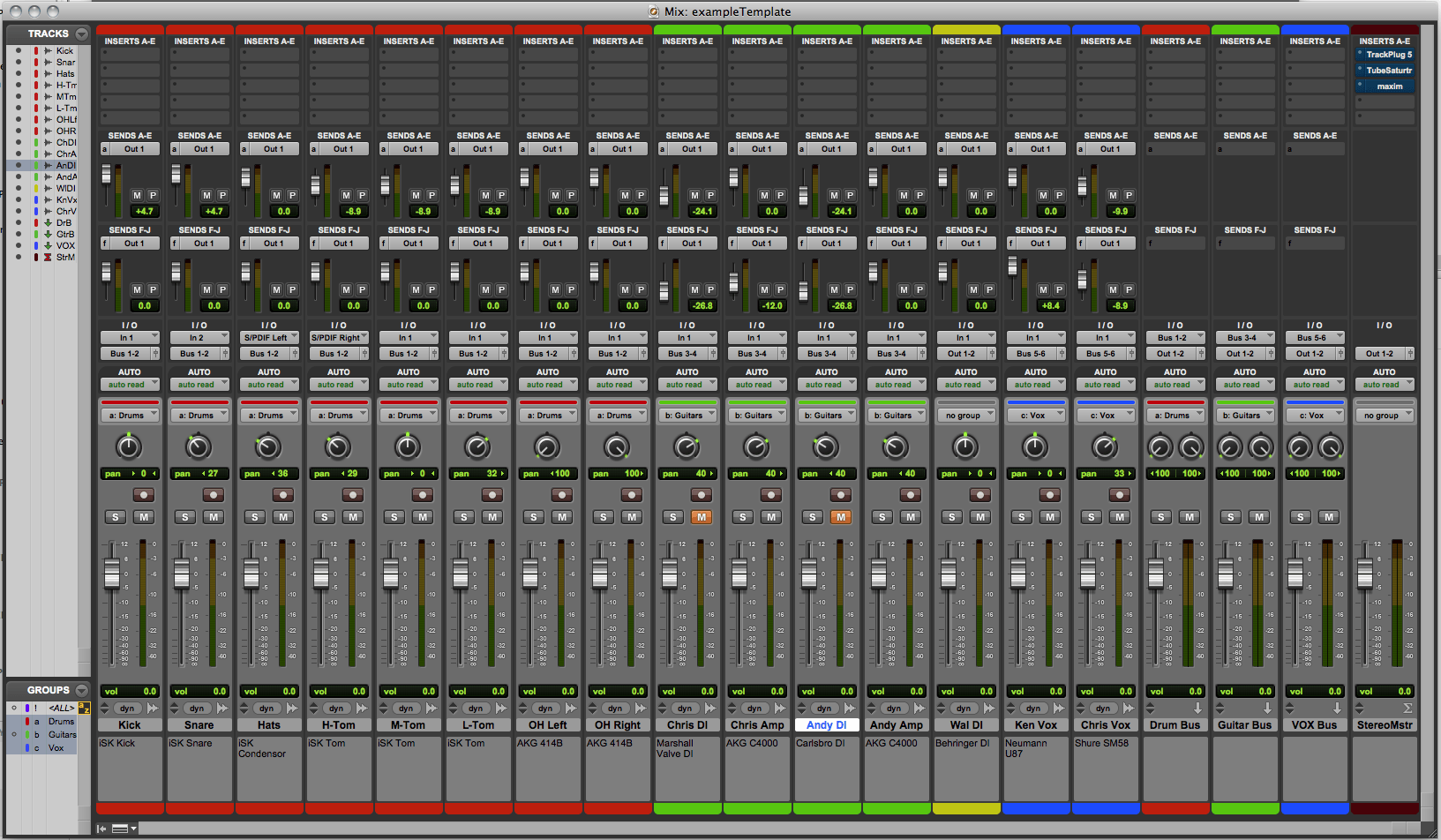
Mix Window.
Version 9 (I chose to skip this upgrade) introduced the ability for Pro Tools to be used with "3rd party audio interfaces"; meaning audio interfaces other than those sold by Avid (the company that develops and sells the Pro Tools software), as well as the option of using your computer's native audio outputs, eliminating the need to a separate audio interface at all. This feature is fairly new for Pro Tools users, as they previously required the use of the interfaces to use the software at all. So, this little convenience may come in handy for me someday.

Secondly, Pro Tools 10 comes with standard with a new "channel strip" plugin, which allows you to get right down to business of the most important audio processing you will do as a DAW user. This plugin emulates the functions of the audio channel of a large format audio mixing console, the kind found in the big-time commercial recording studios. These mixing  console channels typically include EQ, Compression, Expansion, and Gating controls. Without a plugins like these, you can certainly get the job done with individual plugins of each type of effect you need, but it's convenient to have all these functions in a single plugin. I also recently treated myself to the SSL 4000 Collection bundle, by Waves. Part of this bundle includes my new favorite plugin, the SSL E-Channel. This plugin as well as the others in this bundle are emulations of legendary SSL mixing consoles, used to record and mix hit records too numerous to mention. After using both the Avid Channel Strip and the SSL plugin on this mix, I must say that I am a new fan, and will continue to use them on other projects to come. These types of plugins helped me to limit my choices of effects and other processing in a positive way, and apply more focus to getting the mix done.

Avid's Channel Strip Plugin, comes standard with Pro Tools 10.
Waves SSL E-Channel Plugin.
A new feature in Pro Tools 10 is Clip Gain, which allows you to reduce the amount of gain (volume) on a section of audio in your project on-the-fly and in real-time, without having to process and create a whole new audio file similar to older versions of Pro Tools. Also new are features to let you automatically import your new mix into your iTunes library, and upload to SoundCloud as well as Gobbler, an online storage and file sharing website, seemingly geared towards audio and other media creators. The "import to iTunes" feature was especially handy in quickly checking out new mix versions. These handy little features make Pro Tools 10 a nice, if not a "can't-live-without" upgrade for me.

Pro Tools' Clip Gain feature allows changes in volume to individual pieces of audio in real-time.
In some way it feels strange to be "reviewing" these DAW's at this point in time, because I'm always a bit behind the times. It seems that by the time it takes me to post a new piece of music, the DAW that I'm talking about has already been upgraded to a new version. Pro Tools is now on version 11; Reason was also updated to version 7 earlier this year; and just this past July, Apple FINALLY released Logic Pro X.


However, I understand that it doesn't matter in the big scheme of things. For one, just because these DAW's have moved on to new versions, it doesn't mean that I can't continue on with my "experiments" simply using what I have, which are great tools in their own right. They perhaps don't have the shiny newness of whatever version they happen to be on at the moment, but does not in any way hinder me from making music.


Secondly, it looks like the computer system requirements for all 3 new versions are beyond the specs of my current laptop; so, apparently I couldn't upgrade to them if I wanted to. It doesn't really bother me, though. The software versions I'm working with are MORE than capable of being the tools I need to produce some high quality recordings. I remember when all I had to record to was a cassette boombox, so I've got to keep some perspective. I'm still learning and re-learning the important lesson of not focusing on the "tools" themselves (as cool as they are!), but actually learning and using these tools to actually create SOMETHING.

Soon I will start working on my new track in Reason 6, for the 3rd and final installment of this series. Until next time...

Tuesday, May 29, 2012

Streaming Music With My Old Airport Express

A "bonus" post of sorts for this month... Painfully obvious from my recent posts, I’ve been doing a lot of work on my guitars lately. I'm having a blast, but it’s time consuming work. I find that playing some music helps keep things moving along.

Until recently I had been using my iPod for that purpose, because I’m working at my studio workstation desk where my laptop resides. Running iTunes software, computers (along with my iPod) have been my main source of music for years now, effectively replacing all my CD players. The laptop is usually connected to my studio speakers via a special "Y" cable, with an 1/8" stereo mini-plug on one end that goes into the laptop's headphone jack, and the other end splits into separate Right and Left 1/4" plugs that go to the speakers. So when I’m working on my guitars, I have to move the laptop off the desk, and usually onto my bed, nearby. That audio cord I use is way too short to reach from the speakers to the bed - about 3 feet, and I haven't been able to locate longer ones of this type. I could certainly play music from my iTunes on the laptop via the laptop's built-in speakers, which I tried at first. The sound is loud and clear, but a bit wimpy - I need some BASS in the music I listen to! Using the iPod is fine, but having those dang earbuds in my ears for hours on end is rough on my ears, so that’s not ideal either.

I came up with an idea: I remembered that I still have an older Apple Airport Express Wifi base station, bought years ago when 802.11g was the fastest WiFi standard available to most consumers. I replaced it just last year by its big brother, the Airport Extreme, which has the current 802.11n standard and other features that the Express doesn't have. So until now, the Express had been just sitting, collecting dust. However, the Express is unique from the Extreme in that it has an 1/8" stereo audio out jack that you can connect to a pair of speakers, and wirelessly stream your iTunes audio out to those speakers from anywhere in your home. This feature was originally called "AirTunes" when it was available only on the Express. In recent years, Apple came up with AirPlay, which includes streaming audio from iOS devices to computers and Apple TV, and eventually they changed the name for the Express' streaming feature to unify it all together and, I suppose, to make things less confusing.

After plugging in the Airport Express to power, I went to the laptop, and launched the "Airport Utility" program to configure the Express to join my current WiFi network as an AirTunes device. During this setup, you can give your AirTunes speakers a name of your choosing for easy recognition. Then I went to the AirPlay icon button in the lower right corner of my iTunes window, where you configure which speakers you want the iTunes audio to stream to. Once configured, it worked great, no issues whatsoever. I can now have my laptop sitting anywhere in my apartment and stream iTunes into the bedroom connected this way. Yes, the distance from the speakers to the bed is only about 4 or 5 feet, but if you don't have an audio cable that length to connect your laptop and speakers, this comes right in handy. You also have the option to stream iTunes audio out to multiple speakers at once - very cool!

One thing I noticed after configuring the Airport Express to join my WiFi network is that, because the device uses the older and slower 802.11g, it slows down any other devices on the network to that standard, such as my 802.11n Airport Extreme I now use for Internet access. I noticed that web pages (especially with video) load noticeably slower at "g" speeds. The problem could be solved by buying an updated Express that runs on "n", but I wouldn't bother for this type of occasional use. I see myself only using it while I'm working on guitars, or some other situation where I'd need the laptop to be out of the way, and I wouldn't have need for much web browsing then, anyway. I can simply plug in the Express when I want to stream from iTunes, and unplug it when I don't need it, returning to full network bandwidth again with the Extreme. A nice feature, and a good way to put "retired" equipment back to work...

Selecting the AirPlay speakers, labeled "Bedroom".
Airport Express (white box), with an audio cable (orange & grey plugs) connected to my speakers. My laptop - off to the left about 4 or 5 feet away, untethered.

Sunday, January 22, 2012

Finally.

Happy 2012 to everyone... It sure has been a while since I've posted last, but I certainly have something of interest to share today...

After many months of ups & downs, technical issues, setbacks, do-overs and everything else you can think of, I finally have some music to share with you. I have joined Soundcloud to post my music online. There are currently 3 tracks posted, and more in the works. For those who have been waiting - thanks for your patience. Hope you enjoy...

Demos - 2012 by harvard_exp

Saturday, November 5, 2011

In The Mix...

Whew... It's been a busy week for me. Making my best efforts to finish recordings for 3 of my tunes. Not an easy task with a 9-to-5 to contend with, but we do what we must...! I finally finished recording all parts for the songs, and as of last weekend, I am officially in the mixing stage, working every evening when I get home from my job.

Mixing is a crucial part of the recording process that I'm kind of embarrassed to admit I've been struggling with for 15 years now. But for those that have heard my older recordings, it should come as no surprise... The quality of my mixes has always been on the amateur side of town, and that's putting it nicely. It takes a trained and tuned ear, and some degree of skill to create a mix that bears repeated listening. Otherwise, it simply leaves no doubt that you record at home, haha! I feel that if people have to ask if you record in your bedroom or in a "real" studio, then you know you're on to something. That's where I'd like to be someday. Fortunately, I think I made another step toward getting there last week...

Here I'll give a hopefully basic and low-tech rundown of the recording process for those who aren't knowledgeable about how it works. Generally, you start by recording your separate parts that will comprise your musical piece. That can consist of instruments, vocals, sound effects or anything you wish to record as part of your piece. In most cases, each individual instrument or vocal part is given its own separate track. Depending on your equipment, each track can usually be recorded one at a time as overdubs, or all parts can be recorded together live, in the case of recording a band, for example. This process is known as multitrack recording.

Once all parts are recorded, you begin the mixing process, whereby you adjust levels of each track in relation to the others, as well as add EQ and any audio effects that will enhance the overall sound. When you have the mix sounding the way you want, you would then make a 2-track stereo master of your mix, which then allows you to share your music with others, on CD or online. More often than not these days, one is working digitally, so the master itself will consist of an audio file, be it WAV, AIFF, or MP3.

The mixing process can also be referred to a mixdown, because you are mixing several audio tracks (24, 48 or more are not unheard of), down to 2 stereo tracks (1 track for the right speaker, 1 track for the left). Thanks to Surround sound, one also has the option to mix down to 6 or 8 separate tracks, but that's mainly used for those mixing sound for video or feature films. I'm not part of that world, nor do I have a desire to be, at least for now. I have enough trouble mixing down to 2 tracks!

Mixing audio is time consuming, especially if you don't have a clear mental picture of how you want the music to sound. Even the most experienced professional mix engineers will take several hours, even a whole day, to get what he or she is looking for in a final mix, doing multiple versions of the mix for the client to choose from. For those less experienced like myself, the process usually takes several DAYS.

The past week or so has felt like a mission of sorts. This mission has been to tackle long standing issues with mixing my own music. The question at hand was, "What will it take to improve my mixes?" It certainly isn't a question of not having the proper equipment. The current era of technology ensures that high-quality home recordings can be made by nearly anyone with an interest to do so. Like many others out there that record their own music at home, I use multitrack recording software on a laptop, along with a recording interface. That's all I need to do the job, so again, the equipment is definitely not the problem.

For monitoring the mix playback, I use 5-inch stereo monitor speakers. Research, time, and experience have taught me that a good pair of reference monitor speakers with a flat frequency response are essential for creating quality mixes that will translate well to other stereo systems' speakers. By translate, I mean that the music will sound "right" on different types of systems - home stereos, boomboxes, car stereos, iPod earbuds, what have you.

A mixer's best friend (besides their ears).

I'd say that the most important aspect of creating a mix that at least approaches a "professional" level, would be the aspect of clarity. In the past, I'd do a mix that sounded OK on my studio monitors. Next, I'd burn the mix to CD, play it back on another stereo system, and it would sound almost completely different. I mean different in a BAD way. In particular, judging the right amount of bass in a mix was where I invariably had the most trouble. Played on a different system, my mixes always sounded too muffled and boomy, due to way too much low-end. Reducing the low end would often leave me with a mix that sounded thin. It can take a long time to get that right, just starting out. The point being, hearing less than stellar results after long hours of work can be frustrating and discouraging, to say the least.

You typically can hear all the distinct elements of a piece of music in a mix that has clarity. The different instruments and any vocals should not appear to be fighting for the same sonic space, obscuring one another. Rather, each element should have its own space, yet all parts blend together well to form a cohesive whole. In the world of stereo mixing, you often have many different parts that you need to squeeze into the same sonic space between only two speakers!

When those parts share common frequencies, that makes the goal of clarity all the more challenging. On most multi-channel audio mixers (hardware or software equivalent), you will have (at least) controls for adjusting the level (volume) of each individual track, panning (adjusts the track within the stereo spectrum from left to right), and EQ controls. Hands down, the most important things to adjust and experiment with in achieving a good mix. Once those elements are under control, you may have access to audio effects such as reverb and delay that give the audio a sense of space in your track. Compression and limiting, which control dynamics, are equally important. There are many more effects available to utilize, but it's really beyond the scope of this post to go any further into it. I've probably gone too far out there as it is! Hope you're still with me...

Virtual mixer screen in Pro Tools, my recording software of choice.

Which brings me back to my main point. When I have access to all these tools to create my mix, it really comes down to the 2 most important tools of all: my speakers, and my ears. You can have the best equipment in the world, but it won't matter a bit if you have not tuned or trained your ears for this kind of work. Training your ear to make good mixes takes practice, making as many mixes as you need to before you get it right.

That's the lesson I learned this past week, for as many hours as I could squeeze in before having to go to bed and return to work the next day. Working on the first of the three songs, I'm happy to say that I've finally completed a mix that I'm pretty darn satisfied with! Certainly all my past experience helped me get to this point, especially remembering what NOT to do! However, I believe it was increasing my focus and persistence that helped me finally come across to the other side and produce a mix that I could live with. This is not to say that I now know all there is to know about mixing - I still have much to learn and improve on. But I believe that it will make the next mix project that much easier to get it the result I want. That next project is coming up soon, as in next week, if not this weekend! I have two more songs to mix, then I'll finally be able to post them online and share them with you folks out there. No concrete time frame as to when that will be; as I like to say, hopefully sooner rather than later! Till next time...

A book on audio mixing that's provided me with a lot of good info:

The Mixing Engineer's Handbook